Do you struggle with workflow building? Do you want a powerful workflow builder? Building powerful workflows is not as easy as it seems because you need to connect your website to all the tools your business relies on. That’s why you need an amazing workflow builder that saves you more time and effort, such as EasyLink Automations, which you will discover in this review.
EasyLink Automations is a powerful is a no-ware workflow tool designed to connect WordPress with CRMs, email tools, and webhooks.
This will strengthen your business online and get you more profits because many online statistics state the importance of workflow automation:
- Only 4% of businesses have fully automated their workflows, showing a large gap between potential and current adoption.
- According to McKinsey, 50% of work activities can be automated, demonstrating the vast potential for efficiency gains.
- 31% of businesses have automated at least one function, indicating a growing shift toward process optimization.
- Workflow automation increases lead quantity by 80%, conversions by 75%, and qualified leads by 451%, particularly in marketing and sales.
This means workflow automation is a must-have for your WordPress website to boost your profit!
For these reasons, EasyLink Automations is a great business option to discover because it will get your real profit!
What are EasyLink Automations’ Benefits?
EasyLink Automations is an amazing no-code workflow builder to easily generate real benefits such as:
- Connect WordPress with 150+ platforms
- Access 530+ triggers and 550+ actions
- Build unlimited multi-step workflows visually
- Use conditional logic for smarter automation
- Pass dynamic WordPress data between every step
- Trigger workflows with incoming webhooks
- Send data anywhere with outgoing webhooks
- Monitor every automation with detailed execution logs
- Run everything in the background for maximum site performance
- Keep your data on your own server with a completely self-hosted solution
- Replace expensive monthly automation platforms with a faster, more affordable solution built specifically for WordPress.
- Increase your sales and revenue!
- Save your money, time, and effort.
Therefore, EasyLink Automations is a powerful automation plugin to connect WordPress with CRMs, email marketing, webhooks, forms, LMS, WooCommerce, and more!
What Is EasyLink Automations?
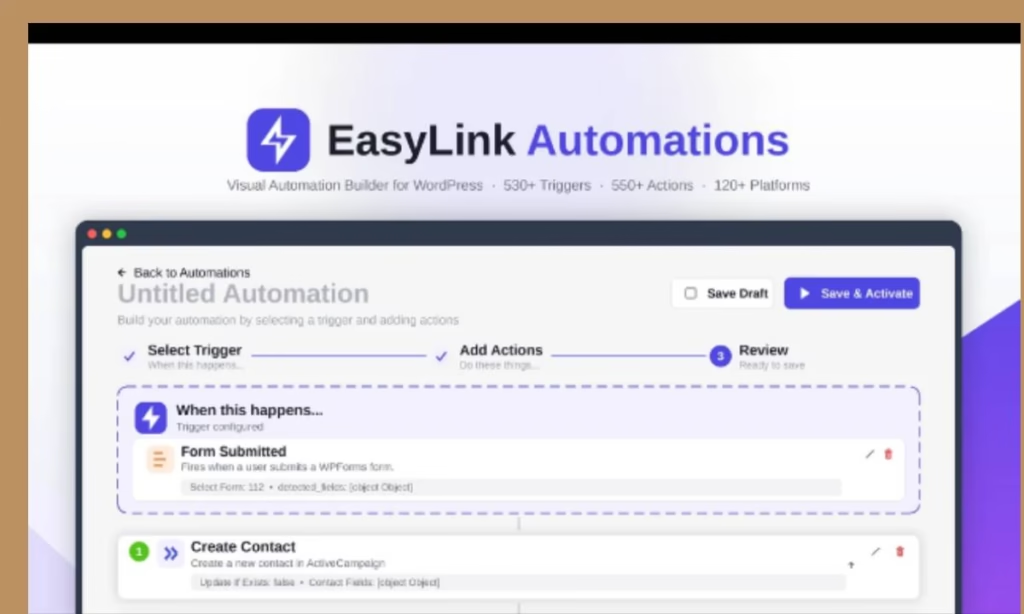
EasyLink Automations is a no-code workflow tool designed to connect WordPress with CRMs, email tools, and webhooks.
This means it creates sophisticated workflows directly inside WordPress that will save you more time and effort!
The best part is it builds unlimited no-code automations with visual workflows, conditional logic, and multi-step actions.
This will save you money by replacing costly automation tools with a fully self-hosted, one-time solution.
It will also keep your site fast and keep your data secure with background processing, detailed logs, and complete data ownership.
Therefore, EasyLink Automations is an amazing online app to automate your WordPress workflows without writing code and connect WordPress with CRMs, email marketing, webhooks, forms, LMS, WooCommerce, and more!
EasyLink Automations Review
Product Name: EasyLink Automations
Front-End Price: $59.00 (Personal Plan) – Lifetime Deal
Guarantee: 30 Day Money-Back Guarantee
Level Skill: All levels
Support: Great Support
Recommend: Highly Recommended
What Makes This Workflow Builder Different?
EasyLink Automations is a great automation plugin because it will:
- Connect WordPress with over 150 popular platforms, including WooCommerce, HubSpot, Mailchimp, Slack, Salesforce, Google Sheets, Notion, Discord, Trello, and more.
- Create powerful automations using a clean visual workflow builder—no coding required.
- Chain unlimited actions together with multi-step workflows, delays, and branching logic.
- Build intelligent automations using advanced AND/OR conditional rules.
- Automatically map posts, users, orders, forms, and custom fields between every action.
- Receive data instantly from external applications using incoming webhooks.
- Send structured data to virtually any service using customizable outgoing webhooks.
- View complete execution logs for every automation and troubleshoot issues with confidence.
- Receive automatic failure notifications to quickly identify and resolve problems.
- Connect services securely using OAuth2, API keys, bearer tokens, or basic authentication.
- Run every workflow asynchronously in the background to keep your website fast.
- Eliminate recurring automation subscription costs with a fully self-hosted solution.
- Keep complete ownership of your data since everything runs on your own WordPress server.
- Scale from a single website to multiple client sites with flexible licensing options.
What Are the Key Features to Strengthen Your Workflow Automation?
- Visual Automation Builder: Create workflows through a simple, intuitive interface without writing code.
- 150+ Platform Integrations: Connect with WooCommerce, HubSpot, Mailchimp, Slack, Google Sheets, Salesforce, Notion, Discord, Trello, and many more.
- 530+ Triggers & 550+ Actions: Build automations for virtually every WordPress event and business process.
- Multi-Step Workflows: Chain multiple actions together with delays, branching, and reliable execution.
- Smart Conditional Logic: Control exactly when actions run using flexible AND/OR conditions.
- Dynamic Field Mapping: Automatically transfer customer, order, post, form, and user data between every connected application.
- Incoming & Outgoing Webhooks: Receive data from external platforms or send structured data to virtually any endpoint.
- Execution Logs: View every workflow run, inspect data, identify failures, and debug with confidence.
- Error Notifications: Receive alerts whenever an automation requires attention.
- Secure Authentication: Connect services using OAuth2, API keys, bearer tokens, and basic authentication.
- Background Processing: Run automations behind the scenes without slowing down your website.
- Completely Self-Hosted: Keep full control of your workflows and data with no recurring per-task or monthly automation fees.
How Do Easylink Automations Work?
EasyLink Automations is an easy-to-use workflow builder. You should just follow these simple steps:
Step 1: Choose a Trigger
Select what starts your automation, such as a WooCommerce order, form submission, user registration, course enrollment, post publication, webhook request, and hundreds of other WordPress events.
Step 2: Build Your Workflow
Add one or multiple actions, map your data, apply conditions, delays, and branching rules to create the exact workflow your business needs.
Step 3: Connect Your Favorite Apps
Integrate with CRMs, email marketing platforms, project management tools, spreadsheets, messaging apps, payment platforms, and more using secure authentication.
Step 4: Activate & Monitor
Turn your automation on and monitor every execution through detailed logs, error reporting, and background processing; all from your WordPress dashboard.
Who Can Use This Amazing No-code Workflow Builder?
EasyLink Automations is built for anyone who wants to eliminate repetitive WordPress tasks and connect their website with the tools they already use.
This means it’s perfect for:
WordPress Site Owners who want powerful workflow automation without expensive monthly subscriptions.
WooCommerce Store Owners looking to automate customer management, order processing, CRM updates, email marketing, and team notifications.
Digital Agencies managing automation across multiple client websites from a single WordPress-based solution.
Freelancers who want an affordable alternative to Zapier or Make while delivering more value to clients.
Small Businesses looking to automate marketing, sales, support, and internal operations without hiring developers.
Course Creators & LMS Websites that need automated enrollments, student notifications, and progress tracking.
Membership Websites managing onboarding, renewals, access control, and member communications automatically.
Developers who want a flexible, extensible automation engine built directly into WordPress.
Whether you’re building simple lead capture workflows or advanced multi-platform business automations, EasyLink Automations gives you the flexibility, control, and performance to automate with confidence.
EasyLink Automations Personal Plan’s features
During this EasyLink Automations review, you will get great features such as:
- 1 Site License
- 150+ Integrations
- Unlimited Automations
- 2 Years Bug Fixing
- Lifetime access to EasyLink Automations
- Lifetime Product Updates
- 30-day money-back guarantee
- One-time purchase of
So these are the main features you will get in this Personal Plan during this limited deal!
However, EasyLink Automations provides more plans (Business Plan and Agency Plan) to upgrade to if you want more advanced features.
EasyLink Automations is a unique workflow builder because it provides great features that can automate virtually any WordPress workflow and save you money by replacing costly automation tools with a fully self-hosted, one-time solution.
That means EasyLink Automations is worth your investment because you will get great features with free updates, lifetime access, a 30-day money-back guarantee, and more.
After this EasyLink Automations review, you have all the details you need to easily make the right decision.
Pros & Cons
Pros
- Easy to use – No skill needed
- For newbies and experts
- Easily connect WordPress with CRMs, email tools, and webhooks
- Create sophisticated workflows directly inside WordPress
- Automate WordPress workflows without writing code
- Connect WordPress with CRMs, email marketing, webhooks, forms, LMS, WooCommerce and more!
- Build unlimited no-code automations with visual workflows, conditional logic and more
- All plans updates
- Lifetime access to EasyLink Automations
- 30-day money-back guarantee
- One-time purchase of
Cons
- Limited offer
- You must redeem your code(s) within 60 days of purchase
Visit The EasyLink Automations Sales Page
Conclusion
EasyLink Automations is a powerful automation plugin to simple to build powerful, no-code workflows that connect WordPress with your favorite CRMs, email marketing, and more!
With EasyLink Automations, you can start automating your WordPress workflows easily.
So I hope this EasyLink Automations review will help you to make the right decision and start automating your WordPress workflows!
Thanks
nadda
Feel free to rate EasyLink Automations