EasyLink Automations Review

Do you struggle with workflow building? Do you want a powerful workflow builder? Building powerful workflows is not as easy as it seems because you need to connect your website to all the tools your business relies on. That’s why you need an amazing workflow builder that saves you more time and effort, such as EasyLink Automations, which you will discover in this review.

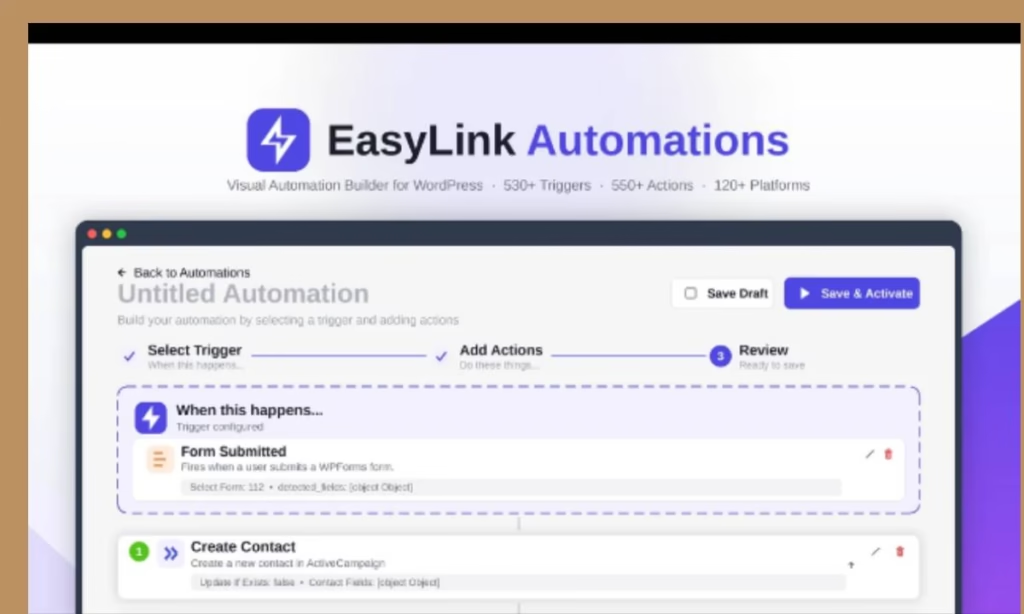
EasyLink Automations is a powerful is a no-ware workflow tool designed to connect WordPress with CRMs, email tools, and webhooks.

This will strengthen your business online and get you more profits because many online statistics state the importance of workflow automation:

  • Only 4% of businesses have fully automated their workflows, showing a large gap between potential and current adoption.
  • According to McKinsey, 50% of work activities can be automated, demonstrating the vast potential for efficiency gains.
  • 31% of businesses have automated at least one function, indicating a growing shift toward process optimization.
  • Workflow automation increases lead quantity by 80%, conversions by 75%, and qualified leads by 451%, particularly in marketing and sales.

This means workflow automation is a must-have for your WordPress website to boost your profit!

For these reasons, EasyLink Automations is a great business option to discover because it will get your real profit!

What are EasyLink Automations’ Benefits?

EasyLink Automations is an amazing no-code workflow builder to easily generate real benefits such as:

  • Connect WordPress with 150+ platforms
  • Access 530+ triggers and 550+ actions
  • Build unlimited multi-step workflows visually
  • Use conditional logic for smarter automation
  • Pass dynamic WordPress data between every step
  • Trigger workflows with incoming webhooks
  • Send data anywhere with outgoing webhooks
  • Monitor every automation with detailed execution logs
  • Run everything in the background for maximum site performance
  • Keep your data on your own server with a completely self-hosted solution
  • Replace expensive monthly automation platforms with a faster, more affordable solution built specifically for WordPress.
  • Increase your sales and revenue!
  • Save your money, time, and effort.

Therefore, EasyLink Automations is a powerful automation plugin to connect WordPress with CRMs, email marketing, webhooks, forms, LMS, WooCommerce, and more!

What Is EasyLink Automations?

EasyLink Automations is a powerful automation plugin to simple to build powerful, no-code workflows that connect WordPress with your favorite CRMs, email marketing, and more!

EasyLink Automations is a no-code workflow tool designed to connect WordPress with CRMs, email tools, and webhooks.

 This means it creates sophisticated workflows directly inside WordPress that will save you more time and effort!

The best part is it builds unlimited no-code automations with visual workflows, conditional logic, and multi-step actions.

This will save you money by replacing costly automation tools with a fully self-hosted, one-time solution.

It will also keep your site fast and keep your data secure with background processing, detailed logs, and complete data ownership.

Therefore, EasyLink Automations is an amazing online app to automate your WordPress workflows without writing code and connect WordPress with CRMs, email marketing, webhooks, forms, LMS, WooCommerce, and more!

EasyLink Automations Review

Product Name: EasyLink Automations

Front-End Price: $59.00 (Personal Plan) – Lifetime Deal

Sales Page: Click Here

Guarantee: 30 Day Money-Back Guarantee

Level Skill: All levels

Support: Great Support

Recommend: Highly Recommended

What Makes This Workflow Builder Different?

EasyLink Automations is a great automation plugin because it will:

  • Connect WordPress with over 150 popular platforms, including WooCommerce, HubSpot, Mailchimp, Slack, Salesforce, Google Sheets, Notion, Discord, Trello, and more.
  • Create powerful automations using a clean visual workflow builder—no coding required.
  • Chain unlimited actions together with multi-step workflows, delays, and branching logic.
  • Build intelligent automations using advanced AND/OR conditional rules.
  • Automatically map posts, users, orders, forms, and custom fields between every action.
  • Receive data instantly from external applications using incoming webhooks.
  • Send structured data to virtually any service using customizable outgoing webhooks.
  • View complete execution logs for every automation and troubleshoot issues with confidence.
  • Receive automatic failure notifications to quickly identify and resolve problems.
  • Connect services securely using OAuth2, API keys, bearer tokens, or basic authentication.
  • Run every workflow asynchronously in the background to keep your website fast.
  • Eliminate recurring automation subscription costs with a fully self-hosted solution.
  • Keep complete ownership of your data since everything runs on your own WordPress server.
  • Scale from a single website to multiple client sites with flexible licensing options.

What Are the Key Features to Strengthen Your Workflow Automation?

  • Visual Automation Builder: Create workflows through a simple, intuitive interface without writing code.
  • 150+ Platform Integrations: Connect with WooCommerce, HubSpot, Mailchimp, Slack, Google Sheets, Salesforce, Notion, Discord, Trello, and many more.
  • 530+ Triggers & 550+ Actions: Build automations for virtually every WordPress event and business process.
  • Multi-Step Workflows: Chain multiple actions together with delays, branching, and reliable execution.
  • Smart Conditional Logic: Control exactly when actions run using flexible AND/OR conditions.
  • Dynamic Field Mapping: Automatically transfer customer, order, post, form, and user data between every connected application.
  • Incoming & Outgoing Webhooks: Receive data from external platforms or send structured data to virtually any endpoint.
  • Execution Logs: View every workflow run, inspect data, identify failures, and debug with confidence.
  • Error Notifications: Receive alerts whenever an automation requires attention.
  • Secure Authentication: Connect services using OAuth2, API keys, bearer tokens, and basic authentication.
  • Background Processing: Run automations behind the scenes without slowing down your website.
  • Completely Self-Hosted: Keep full control of your workflows and data with no recurring per-task or monthly automation fees.

How Do Easylink Automations Work?

EasyLink Automations is an easy-to-use workflow builder. You should just follow these simple steps:

Step 1: Choose a Trigger

Select what starts your automation, such as a WooCommerce order, form submission, user registration, course enrollment, post publication, webhook request, and hundreds of other WordPress events.

Step 2: Build Your Workflow

Add one or multiple actions, map your data, apply conditions, delays, and branching rules to create the exact workflow your business needs.

Step 3: Connect Your Favorite Apps

Integrate with CRMs, email marketing platforms, project management tools, spreadsheets, messaging apps, payment platforms, and more using secure authentication.

Step 4: Activate & Monitor

Turn your automation on and monitor every execution through detailed logs, error reporting, and background processing; all from your WordPress dashboard.

Who Can Use This Amazing No-code Workflow Builder?

EasyLink Automations is built for anyone who wants to eliminate repetitive WordPress tasks and connect their website with the tools they already use.

This means it’s perfect for:

WordPress Site Owners who want powerful workflow automation without expensive monthly subscriptions.

WooCommerce Store Owners looking to automate customer management, order processing, CRM updates, email marketing, and team notifications.

Digital Agencies managing automation across multiple client websites from a single WordPress-based solution.

Freelancers who want an affordable alternative to Zapier or Make while delivering more value to clients.

Small Businesses looking to automate marketing, sales, support, and internal operations without hiring developers.

Course Creators & LMS Websites that need automated enrollments, student notifications, and progress tracking.

Membership Websites managing onboarding, renewals, access control, and member communications automatically.

Developers who want a flexible, extensible automation engine built directly into WordPress.

Whether you’re building simple lead capture workflows or advanced multi-platform business automations, EasyLink Automations gives you the flexibility, control, and performance to automate with confidence.

EasyLink Automations Personal Plan’s features 

During this EasyLink Automations review, you will get great features such as: 

  • 1 Site License
  • 150+ Integrations
  • Unlimited Automations
  • 2 Years Bug Fixing
  • Lifetime access to EasyLink Automations
  • Lifetime Product Updates
  • 30-day money-back guarantee
  • One-time purchase of

So these are the main features you will get in this Personal Plan during this limited deal!

However, EasyLink Automations provides more plans (Business Plan and Agency Plan) to upgrade to if you want more advanced features.    

EasyLink Automations is a unique workflow builder because it provides great features that can automate virtually any WordPress workflow and save you money by replacing costly automation tools with a fully self-hosted, one-time solution.

That means EasyLink Automations is worth your investment because you will get great features with free updates, lifetime access, a 30-day money-back guarantee, and more.

After this EasyLink Automations review, you have all the details you need to easily make the right decision.

Pros & Cons

Pros

  • Easy to use – No skill needed
  • For newbies and experts
  • Easily connect WordPress with CRMs, email tools, and webhooks
  • Create sophisticated workflows directly inside WordPress
  • Automate WordPress workflows without writing code
  • Connect WordPress with CRMs, email marketing, webhooks, forms, LMS, WooCommerce and more!
  • Build unlimited no-code automations with visual workflows, conditional logic and more
  • All plans updates 
  • Lifetime access to EasyLink Automations
  • 30-day money-back guarantee
  • One-time purchase of

Cons

  • Limited offer
  • You must redeem your code(s) within 60 days of purchase

Visit The EasyLink Automations Sales Page

Conclusion

EasyLink Automations is a powerful automation plugin to simple to build powerful, no-code workflows that connect WordPress with your favorite CRMs, email marketing, and more!

With EasyLink Automations, you can start automating your WordPress workflows easily.

So I hope this EasyLink Automations review will help you to make the right decision and start automating your WordPress workflows!

Thanks

nadda

Feel free to rate EasyLink Automations

Robomotion RPA Review

Repetitive business tasks can consume your time, money, and effort. That means you need another perfect solution to fix those repetitive tasks and save your team time and effort. You need to automate those tasks by using Robomotion RPA, which you will discover in this review.

Robomotion RPA is a perfect robotic process automation bot to automate all your business tasks with ease and accuracy.

This enables you to automate web or desktop applications that don’t have an API with cross-platform robots that work on Mac, Linux, and Windows.

Therefore, robotic process automation is a useful process you should implement within your business because it will easily boost your profits, according to these automation statistics:

  • 68% of employees have too much work to handle daily.
  • Automation and AI are reported to take up 10-25% of banking tasks.
  • Over 64% of global manufacturing activities can be automated.
  • 76% of companies use automation to standardize daily workflows, making routine tasks faster and more consistent.
  • 62% of companies report three or more major process inefficiencies that could be solved through workflow automation.
  • 58% of organizations automate reporting and planning processes, improving decision-making with real-time data.
  • 61% of businesses that implement sales automation tools see ROI within six months.
  • 80% of sales teams report higher lead quantity when using workflow automation in their CRM systems.

Thus, RPA automation is a must-have business app for your company because it will save you money, effort, and time, which allows your business to be more productive.

That’s why you should consider Robomotion RPA!

What are Robomotion RPA’s benefits?

Robomotion RPA is a great marketing solution for your business to fix the headache of repetitive business tasks and bring more benefits, such as:

  • Easily deal with daily business tasks.
  • Increase your company’s productivity.
  • Generate more leads and sales.
  • Improve your company’s performance.
  • Boost your revenue.
  • Build a powerful brand.
  • Save your money and time.

So, Robomotion RPA is an amazing RPA solution that will help you automate repetitive tasks and boost your company’s productivity and competitiveness.

What’s Robomotion RPA?

Robomotion RPA is a robotic process automation bot to automate all your business tasks easily and efficiently.

So you can automate web or desktop applications that don’t have an API with cross-platform robots that work on Mac, Linux, and Windows.

Watch Robomotion’s video presentation.

Therefore, Robomotion is a great robotic process automation tool to perfectly automate web and desktop applications to streamline your workflow.

Robomotion RPA Review:

Product Name: Robomotion RPA

Co-Founder Name: Faik Uygur 

Sales Page: Click Here

Front-End Price: $109 (Tier 1) – Lifetime deal!

Level Skill: All levels

Support: Fast Support

Recommend: Highly Recommended

Robomotion RPA ’s Features:

Robomotion RPA is a powerful RPA bot to automate repetitive tasks and generate more profit using amazing features, such as:

  • Users 2
  • Production robots 2
  • Application robots 5
  • Flows 25
  • Robot scheduling 30 minutes
  • Versions
  • 3-month audit logs
  • 3-month job logs
  • AI agent
  • Chat assistant
  • Integrations: Excel, Pabbly Connect, Webhooks, WhatsApp, and WordPress.
  • Lifetime access to Robomotion RPA
  • All future Startet plan updates
  • 60-day money-back guarantee.
  • One-time purchase of.

So these are the main features you will get in this limited lifetime subscription. 

This means you should take action if you want to profit from this limited offer before this deal expires.

Who can leverage this robotic process automation tool 

Robomotion RPA is a perfect RPA robot to effectively automate your repetitive data tasks and easily grow your company. 

So you can also use those RPA robots for many businesses, such as:

  • Content creation.
  • Marketing agency.
  • E-commerce business.
  • Crypto business.
  • Developer.
  • Online marketer.
  • And much more…

Therefore, Robomotion RPA is a great RPA solution for your business to boost your productivity via automating repetitive tasks.

What Users Are Saying about this RPA Platform?

Good Support and Value for Money. – Avinash.Katta

“I was able to automate browser tasks, Excel/Word tasks, and scraping, where I usually waste hours on.

Pros –

Scrape Data for Competitive Research – Robomotion can open websites, extract data, and store it in Excel/CSV.

Automate Repetitive Desktop Tasks – If your workflow involves Excel, Word, PDFs, or desktop apps, Robomotion can automate them.

Automatically Upload/Repost Content to Multiple Platforms – If you post content every day, you can automate.

Cross-platform support: Mac, Linux, and Windows.

Ready-to-use automation templates to help you get started.

Ability to schedule bots by minutes, hours, days or weeks.

Low-code flow designer: drag & drop with optional scripting (JS) for advanced logic.

Multi-step flows: you can build workflows that do many internal tasks in one automation project.

Cons –

Not built for absolute beginners – Let me be honest: if you are completely non-technical, you will feel lost in the beginning.

There’s a learning curve.

First-time setup can feel overwhelming – Your first few flows will confuse you.

I struggled a bit, and many users have reported the same.”

This is another NO-BRAINER! – RossSivertsen

“I started using Robomotion in December of 2021 when it first came out on AppSumo, I was looking for a cost-effective alternative to UiPath. – RossSivertsen

And it was a great product then as it is outstanding now.

Robomotion provides essential RPA features in a very approachable and easy-to-use package. Its visual workflow builder is easy to understand, deploy, and develop in.

I’ve seen the product improve and expand since then. I think it’s one of the best opportunities available on AppSumo. If you compare this to UiPath, there’s no brainer for buying this app. You need to run, not walk, to go get this before it expires.

I’ve upgraded to the highest tiers twice and now I’ve upgraded again to the tier 6. This was an easy call for me in automating work for my clients.”

Indispensable tool – hamsini

“I’ve been using Robomotion RPA to run automations on my computer, and honestly, it’s been a game changer for me. Processes that were manual and would take days just literally takes a second!

There is a learning curve but setting things up is pretty easy – however it is helpful if you are slightly technical or willing to learn. Personally, I don’t have a programming background but a little AI and javascript and some strong sense of programming logic will do the trick. I rely mostly on their ‘function’ node, which takes things up several notches – lets you accomplish virtually anything you can think of. Everything just works—I haven’t had issues with things breaking or stopping randomly.

What I really like is how well it connects with AI stuff – I’ve got it connected to Straico. That part was simple to get going, and now a lot of repetitive tasks just happen in the background without me having to think about them!

The support is great – they are active on discord and have helped resolve any issues straightaway.

Overall, I’m extremely happy with Robomotion RPA. If you want something that just works and saves you time, I’d definitely recommend giving it a shot – do not pass this up!!”

Deal Terms & Conditions:

  • Lifetime access to Robomotion RPA.
  • All future Starter Plan updates.
  • If the Plan name changes, the deal will be mapped to the new Plan name with all accompanying updates.
  • No codes, no stacking; just choose the plan that’s right for you.
  • You must activate your license within 60 days of purchase.
  • Ability to upgrade between 6 license tiers while the deal is available.
  • Ability to downgrade between 6 license tiers within 60 days of purchase.

Is Robomotion RPA Worth Your Investment?

Robomotion RPA is a powerful robotic automation that will help you automate web and desktop applications to streamline your workflow.

This robotic automation will save your business much money, time, and effort, and increase your company’s productivity and competitiveness.

Robomotion RPA is also the best alternative to UiPath because it’s easy to use and includes a lifetime plan with all future updates and more features.

That means it’s worth your investment because it avoids boring repetitive tasks such as collecting data, entering user info, and so on.

After this Robomotion RPA review, you can easily make the right decision that suits your company’s strategy.

Pros & Cons

Pros

  • Easy to use – No skill needed.
  • For newbies and experts.
  • Integrations: Excel, Pabbly Connect, Webhooks, WhatsApp, and WordPress.
  • Lifetime access to Robomotion RPA.
  • All future Startet plan updates.
  • No code, no stacking. Just select the plan that’s right for you.
  • 60-day money-back guarantee.
  • One-time purchase of.

Cons

  • Limit offer.
  • You must activate your license within 60 days of purchase.

Visit Robomotion RPA Sales Page

Conclusion

Robomotion RPA is an amazing marketing solution to automate repetitive tasks and increase your productivity because it offers powerful RPA bots to easily automate web and desktop applications to streamline your workflow.

That means it’s worth your investment because it includes lifetime access, plan updates, and more features that will generate more profit.

So I hope this Robomotion RPA review will help you make the right decision that will help you grow your company fast.

Feel free to leave your comments or suggestions.

Nada

Ziligma’s manager

Logic Sheet Review

Doing repetitive tasks manually is frustrating and loses you more time and effort. That’s why you should strengthen your business by automating repetitive tasks, using amazing Google sheets automation like Logic Sheet that you will discover in this review.

Logic Sheet is a perfect spreadsheet software to easily automate repetitive tasks in Google Sheets.

This means you can quickly set up a single automation workflow, and let Logic Sheet do the work for you that will save you more time and effort.

This Google sheet automation is a goldmine for your company because it increases your productivity, helps you to focus on marketing your business and generates more profits.

That’s why many business statistics state the importance of automating repetitive tasks (Source: flair hr): 

  • 51% of companies use automation for cost savings.
  • 31% of businesses have fully automated at least one function.
  • 76% use automation for standardizing daily workflows, 58% for data reporting, and 36% for regulation and compliance.
  • 88% of small business owners say automation enables competition with larger companies.
  • 65% of knowledge workers are less stressed due to automating manual tasks.

So automating your work is a profitable task that you should consider if you want to quickly scale your business and make more profits.

What are Logic Sheet’s Benefits

Logic Sheet is an amazing online app to easily make real benefits such as:

  • Efficiently automate repetitive tasks
  • Easily create workflow
  • Boost your sales productivity
  • Strengthen your company
  • Increase your sales and revenue
  • Streamline your work in Google sheets
  • Save your time and effort

Therefore, Logic Sheet is a great marketing tool to perfectly boost your company’s productivity and make more profits.

What is Logic Sheet

Logic Sheet is a powerful marketing software to easily automate repetitive tasks in Google Sheets because it allows you to quickly set up a single automation workflow, and let Logic Sheet do the work for you!

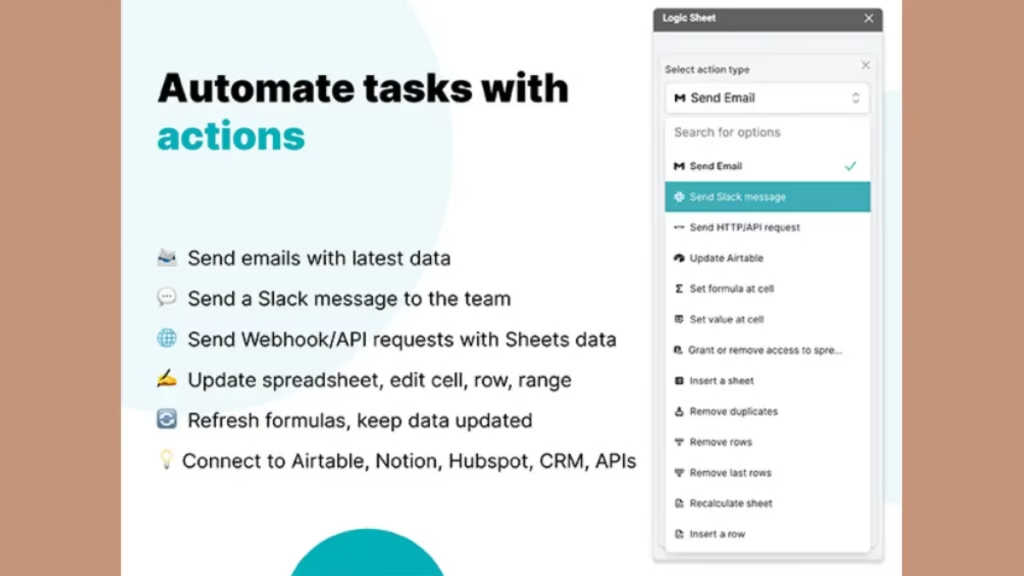
For example, you can set up automation workflows to let Logic Sheet send an email notification or send a Slack message when your spreadsheet is edited.

For more details, you can watch this Logic Sheet’s video

So Logic Sheet is a perfect Google Sheets add-on to easily automate your repetitive tasks which will save more time and effort.

Logic Sheet Review

Product Name: Logic Sheet

Founder: Diogo Cuoco

Front-End Price: $99.00 – Lifetime subscription

Sales Page: Click Here

Level Skill: All levels

Support: Great Support

Recommend: Highly Recommended

Logic Sheet’s features 

Logic Sheet is an amazing Google sheet automation with valuable features such as: 

  • Unlimited automation executions per day
  • Unlimited automation creation
  • Works in unlimited sheets
  • Get access to all templates and automation recipes
  • Automations run on the cloud 24/7
  • Updates Included
  • Access options: desktop
  • Max number of device(s): 1
  • Updates included
  • Length of access: lifetime
  • Redeem your code within 30 days of purchase
  • One time purchase of

So these are the main features you will get in this smart sheet automation during this limited deal!

This means you should make your decision now and get this software to automate repetitive tasks before the offer expires.

This Google sheet automation

Logic Sheet also allows you:

  • Easy to start by using Logic Sheet’s pre-built Templates. Simplify your automation journey with Logic Sheet’s template gallery, a curated collection of pre defined templates and recipes designed to cater to a variety of tasks and industries.
  • Explore a diverse range of templates tailored for different needs, from project management and data analysis to customer relationship management and beyond. Each template is crafted with industry best practices in mind, ensuring that you can leverage the power of automation without the need for extensive configuration.
  • Harness the collective knowledge of the Logic Sheet community and our dedicated customer support through the “Import from Recipe” feature. Share automation recipes with fellow users or import ready-made solutions directly into your Logic Sheet environment.
  • Import automation recipes become effortless as you can simply paste the shared recipe, allowing you to replicate proven workflows with just a few clicks. Benefit from the collective expertise of community members and our support team to accelerate your automation projects.

Logic Sheet is a Google Cloud Partner

This means that Logic Sheet has been recognized by Google Cloud for its expertise in delivering services, solutions, or products that utilize Google Cloud technologies. 

Google Sheets™ is a trademark of Google LLC.

Who can leverage this Google spreadsheet automation

You can use Logic Sheet to quickly automate repetitive tasks for many businesses such as:

  • Content creation
  • Web design
  • Web developing
  • Sales manager
  • Agency
  • Ecommerce business
  • Elearning business
  • Small and big business
  • Online entrepreneur 
  • And much more…

So you can leverage Logic Sheet to easily automate your repetitive tasks and create workflow automation as well to manage your business.   

Is Logic Sheet worth your investment

Logic Sheet is a unique marketing tool to quickly streamline your business because it allows you to quickly automate repetitive tasks in Google Sheets by creating automation workflows and saving more time and effort.

Best of all, it has been recognized by Google Cloud as a great partner for its expertise in delivering services and solutions. 

Therefore, Logic Sheet is worth your investment because you will boost your business’ productivity and scale your company through automating repetitive tasks and setting up a perfect automating workflow.

It also offers you great features to easily strengthen your work in Google Sheets such as: unlimited automation executions per day, unlimited automation creation, work in unlimited sheets, free updates, lifetime access and more.

After this Logic Sheet review, you have all the details you need to easily make the right decision.

System Requirements

  • Works within Google Sheets
  • Works in any latest version of any modern browser
  • Windows/Mac/Linux/ChromeOS

Pros & Cons

Pros

  • Easy to use – No skill needed
  • For newbies and experts
  • Unlimited automation executions per day
  • Unlimited automation creation
  • Works in unlimited sheets
  • Automations run on the cloud 24/7
  • Updates included
  • Length of access: lifetime
  • One time purchase of

Cons

  • Limited offer
  • Unredeemed licenses can be returned for store credit within 30 days of purchase
  •  Once your license is redeemed, all sales are final

Visit Logic Sheet Sales Page

Conclusion

Logic Sheet is a great spreadsheet software to easily automate repetitive tasks in Google Sheets and scale your business because it provides amazing features to set up automation workflow, and let Logic Sheet do the work for you.

That’s why Logic Sheet is the best alternative to many other spreadsheet automation in the market!

So I hope this Logic Sheet review will help you to make the right decision and start automating your repetitive tasks.  

Thanks

nadda

Feel free to rate Logic Sheet